> For the complete documentation index, see [llms.txt](https://doku.photovate.de/llms.txt). Markdown versions of documentation pages are available by appending `.md` to page URLs; this page is available as [Markdown](https://doku.photovate.de/photovate-erp/dashboards/mein-dashboard.md).
# Mein Dashboard
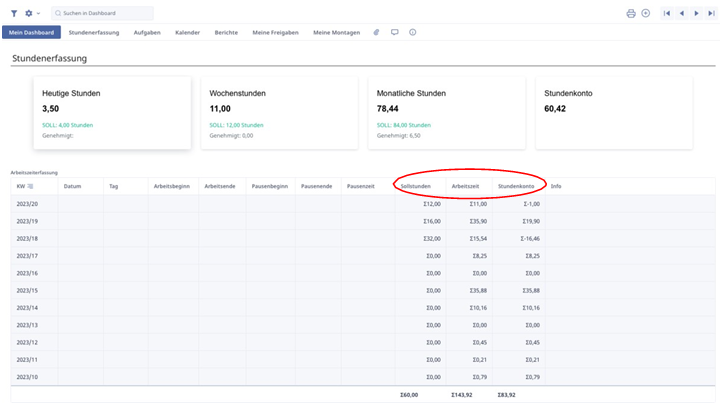
Die Tabelle „Dashboard“ dient als Startseite für jeden Mitarbeiter, der das ERP-System nutzt. Hier finden sich mehrere Karteireitern, um dem Mitarbeiter eine bessere Übersicht zu bieten. Die tabellarische Ansicht zeigt uns nochmal einmal genau, wie viele Sollstunden in jeder Kalenderwoche geleistet werden sollten, unsere tatsächliche Arbeitszeit und am Ende die Differenz für das Stundenkonto.
Um das persönliche Dashboard effektiv zu nutzen, ist es erforderlich, einmalig einen entsprechenden Reiter zu erstellen. Dies kann durch das Navigieren zu dem Punkt "Dashboard" oben rechts erfolgen, gefolgt von einem Klick auf das Plus-Symbol.